New: pGmail with AI, campaigns and follow-ups, plus Calendar, Recruitment and My Drive

Run your whole team from one secure workspace

Chat, calls, tasks, attendance, leave, payroll, a business-development CRM, an executive dashboard and an AI manager, built together so work, time, pay and pipeline never live in different tools again.

  • Real-time updates
  • Role-based access
  • Two-factor sign-in
  • Android app and web, on any screen

Your entire team. One connected workspace.

From everyday conversations to tasks, attendance, payroll, and AI-powered follow-ups, see your team's work come together in one secure place.

Animated walkthrough of the PIY Action workspace: a manager opens the dashboard and team chat, assigns a task, an employee requests leave and a manager approves it, and an administrator asks PIY Bot to create a follow-up task that appears on the board.
42
connected capabilities
3
roles with least-privilege access
Live
chat, calls and notifications
Server-side
permission checks on every request

Modules: Team chat, Voice and video calls, Call recording, Meeting notes, Projects, Tasks, Attendance, Extra hours, Payroll, Calendar, Recruitment, PIY CRM, Executive dashboard, Colourful CRM dashboard, Header notices, Global search, Time tracking, Themes, My Drive, PIY Bot, Android app, Push notifications.

Features

Everything your team needs, working as one

Each module shares the same people, permissions and data, so an approved leave flows into attendance, payroll and the dashboard without anyone retyping it.

Team chat that scales

Channels and direct messages with rich formatting, replies and the history you need, without the weight you don't.

More

Team chat that scales

  • Bold, lists, links and code in messages
  • Reply, edit, copy and delete your own messages
  • Pin and mute conversations
  • Search inside any conversation
Tap or press again to turn back

Presence and read receipts

See who is around and know your message landed, with the privacy controls people expect.

More

Presence and read receipts

  • Online, away and offline status
  • Sent, delivered and read ticks
  • Live unread counts
  • Hide your last-seen time
Tap or press again to turn back

Files, images and PDFs

Share work in the conversation. Images and PDFs open in a built-in viewer; everything stays private to the people in the chat.

More

Files, images and PDFs

  • Paste or drag images straight in
  • Zoomable image and page-by-page PDF viewer
  • Content-checked uploads, never public links
  • Word and Excel files download safely
Tap or press again to turn back

Voice messages

Say it faster than you can type it. Record, preview and send, then listen at your own speed.

More

Voice messages

  • Record and preview before sending
  • Playback speed control
  • Microphone released as soon as you stop
  • Works on phone and desktop
Tap or press again to turn back

Voice, video and group calls

Call a colleague or a whole channel from the chat. Audio and video go directly between browsers, encrypted.

More

Voice, video and group calls

  • One-to-one and group calls
  • Mute, camera, device selection
  • Share your screen in a call
  • Relay support for strict networks
Tap or press again to turn back
New

Call recording with consent

Save a call in supported browsers after every joined participant agrees, with a visible capture status for everyone.

More

Call recording with consent

  • Separate consent for recording and transcription
  • Consent withdrawal or participant changes stop capture
  • Private playback and downloads for eligible participants
  • Configurable retention, with a 30-day default
Tap or press again to turn back
New

PIY Bot meeting notes

When enabled by your administrator, turn consented call audio into transcripts, discussion notes and proposed actions for review.

More

PIY Bot meeting notes

  • Processed after capture stops, not a live transcript
  • Decisions, risks and open questions
  • Review and edit each action before creating a task
  • Tasks link back to the source meeting
Tap or press again to turn back

Remote screen viewing

Let a colleague see your screen to help you. A one-time code and password, and nothing is visible until you approve.

More

Remote screen viewing

  • Separate code and password, expiring in minutes
  • You approve every request and can stop instantly
  • Optional pointer, only when you allow it
  • Full session history and audit trail
Tap or press again to turn back
Recent improvements

Smoother days, clearer records

  • Themes your way

    Administrators set the default look for everyone, with light and dark palettes, presets and readable-colour checks. People can still pick light or dark for themselves.

  • Task history and real time tracking

    A new Critical priority and severity level, plus every status change, reopening and reassignment recorded on the server. Start a timer or add time by hand, and report totals by person, task or project.

  • Automatic check-out

    Optional and off by default. Forgotten check-outs are closed at the end of each person's own shift after a grace period, clearly marked, audited and never overwriting a real check-out.

  • Search that respects permissions

    One search box for tasks, projects, CRM records, files and people. The server only returns what the person is already allowed to open.

  • Colourful dashboards

    Executive and CRM dashboards share one look: gradient figure tiles with icons, trend lines drawn from real daily values, a lead funnel and area charts that follow your theme colours. Every figure still opens the records behind it.

  • Header notices

    Administrators can pin a one-line information, warning, announcement or critical message in the header. Click it to read the full text. It stays for everyone until an administrator turns it off.

  • Searchable dropdowns

    Every dropdown can be searched by typing, works with the keyboard and screen readers, and looks the same across the whole app.

  • Consistent tables and CSV export

    Tables share sorting, filtering and column controls, and grids can be exported to CSV with spreadsheet formula characters neutralised.

  • A friendlier Welcome

    Today's priorities, quick actions for the modules you can use, a getting-started checklist, and company announcements, quotes and videos scheduled by administrators.

New: Executive dashboard

See how the business is really doing

Work, time and pipeline in one view. Every number comes from your own records, says how it is calculated, and shows “no data” instead of a misleading zero.

  • Pick today, this week, month, quarter or your own dates, and every figure is compared with the equally long period before it
  • The Business Pulse is a weighted average of the parts that have data. A part with no data is left out, and the score is withheld rather than guessed
  • Hover any card to read exactly how it is calculated, then open the records behind it
  • The Action Center lists what needs attention, with the rule and threshold that raised each item
  • Employees see their own workspace; managers and admins see the company; CRM and revenue figures follow CRM permissions
  • Admins set revenue targets and tune the weights and alert thresholds, and anyone can export the figures as CSV

Business Pulse: how the score is built

CSV export
  • Task execution · completed on timedefault weight 30%
  • Attendance · attended of scheduled daysdefault weight 20%
  • Sales vs target · revenue won vs target, paceddefault weight 20%
  • Overdue health · overdue of open tasksdefault weight 15%
  • Follow-up discipline · CRM follow-ups completeddefault weight 15%

Action Center rules include

Task past its due date · task stuck in review · leave waiting for a decision · check-in without a check-out · follow-up past due · revenue target at risk

An outline of the dashboard's structure and default weights. Admins can change the weights.
PIY CRM

Win more work, with numbers you can trust

A CRM built for business development teams: find the lead, log what happened, never miss a follow-up, and see how the pipeline is really doing.

  • Personal CRM workspaces with configurable experience guidance, channels, targets and onboarding checklists
  • Contextual PIY Bot drafts and next-action suggestions, with human review and existing CRM access controls
  • Leads, companies, contacts and jobs in one place, with duplicates caught before they are saved
  • A pipeline you can rename and reorder, with the history of every move
  • Follow-ups with overdue and stale warnings, so nothing quietly goes cold
  • Import from Excel or CSV and see every problem before anything is saved
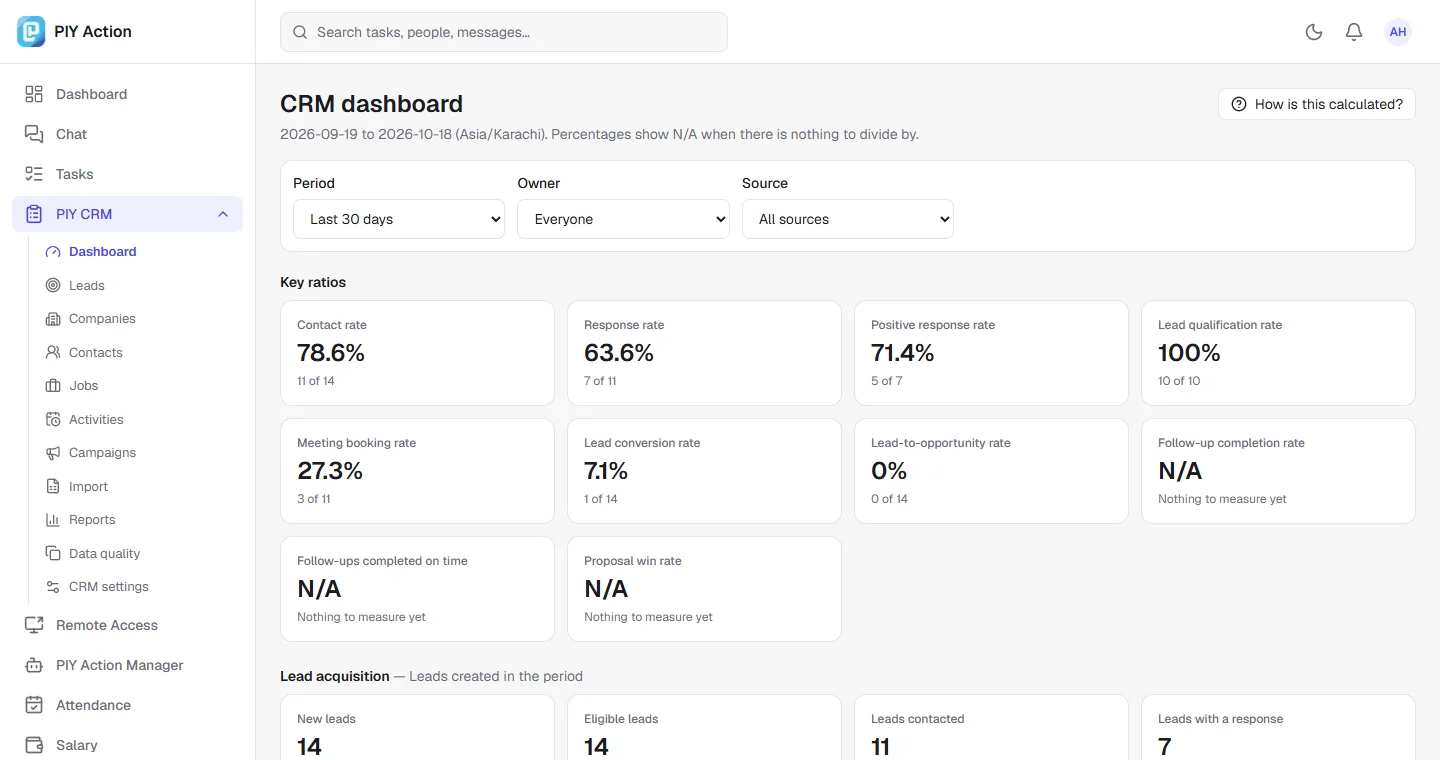
  • Rates that show N/A when there is nothing to divide by, and open to the records behind every number
  • Roles that decide what people can do and whose records they can see, enforced on the server

Your team logs calls, emails and messages by hand today, and the CRM never claims a message was delivered or read. Connections to email, LinkedIn and calendars are not part of this release.

The PIY CRM dashboard with contact, response, meeting and conversion rates, each showing how many records it counts, and N/A where nothing can be measured yet.
The dashboard: every rate shows what it counts. Sample data.
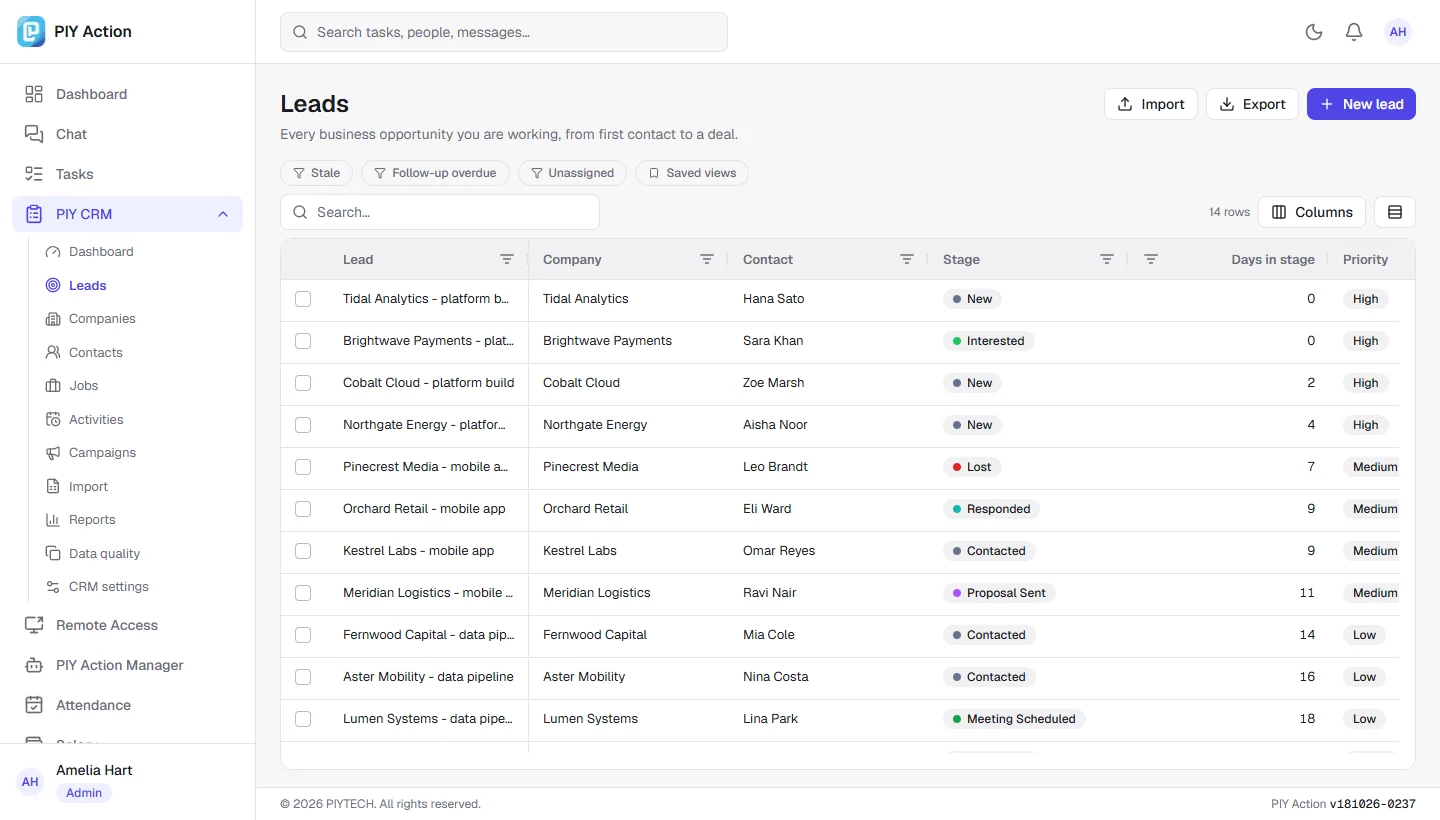
The PIY CRM leads table with company, contact, pipeline stage, days in stage and priority, with filters and saved views.
Leads: filter, sort and save views. Sample data.
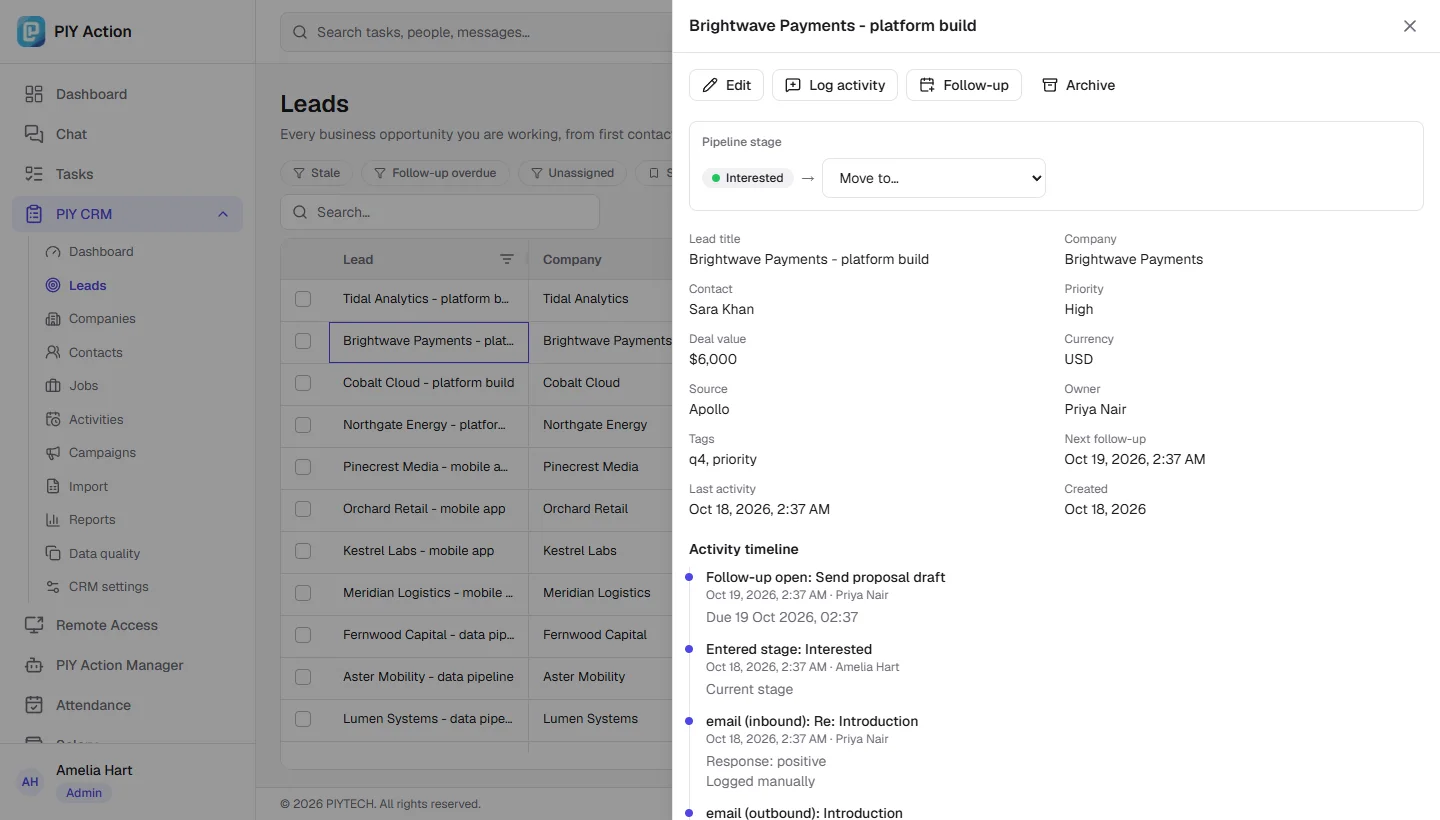
A lead record in PIY CRM with its pipeline stage, deal details and a timeline of activity and stage changes.
A lead with its full timeline. Sample data.
Android app

Your workspace, in your pocket

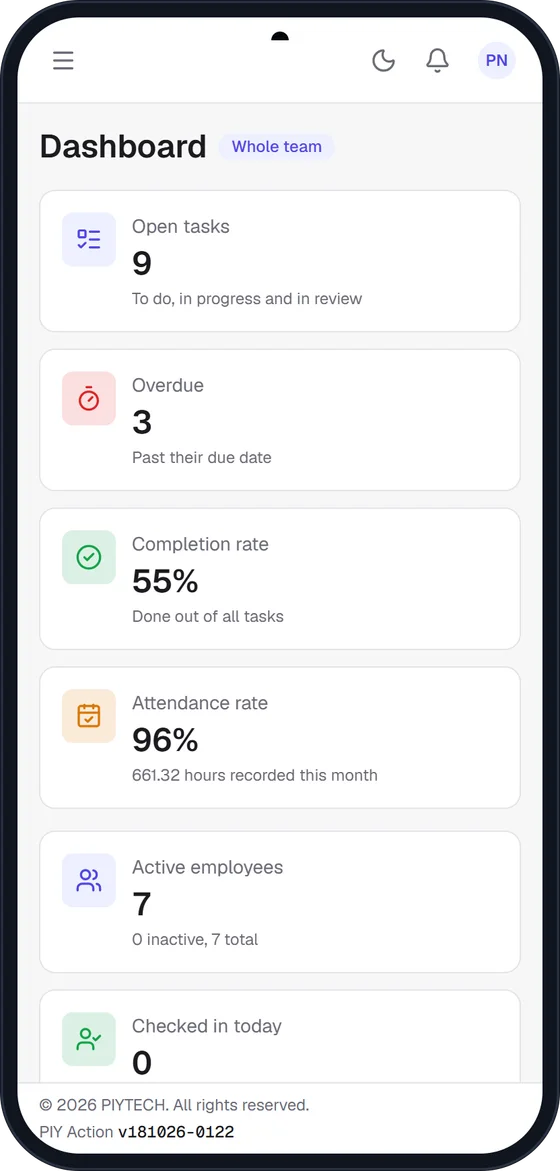
The PIY Action Android app brings chat, calls, tasks and attendance to your phone, with notifications that reach you even when the app is closed.

  • Push notifications for messages, calls and updates, even when the app is closed
  • Voice and video calls, voice messages, photos and files
  • Check in, request leave and approve requests on the go
  • The same account, roles and security as the website

Your organisation distributes the Android installer. Ask your administrator how to get it.

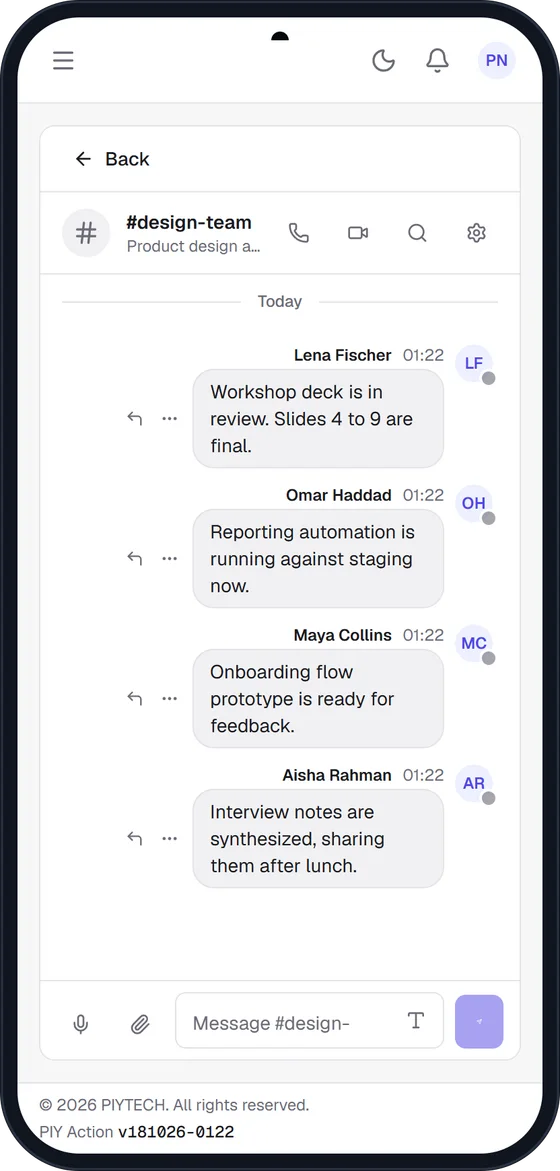
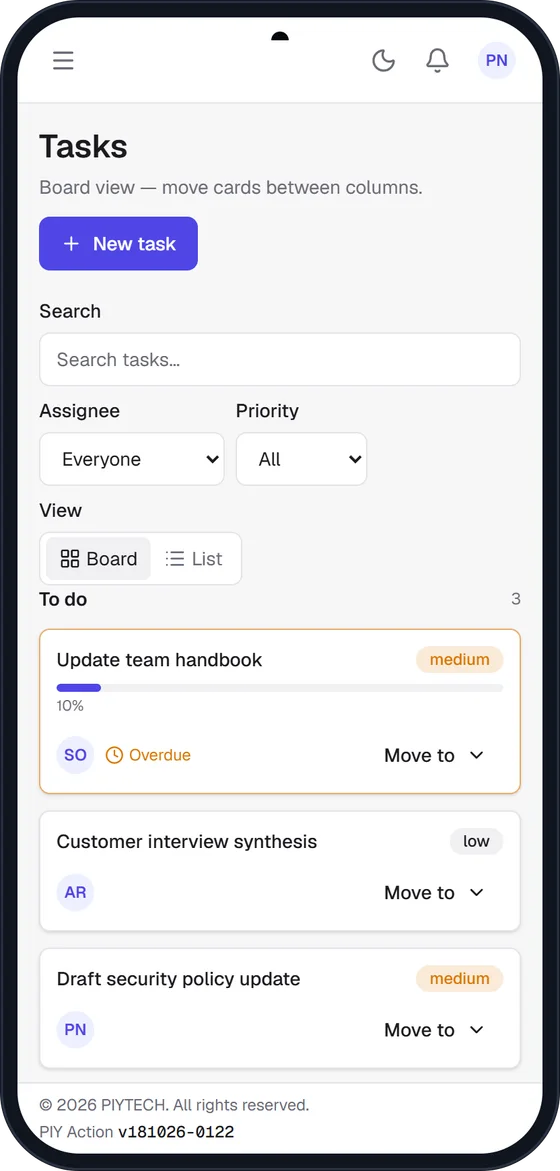
The PIY Action dashboard on an Android phone: open tasks, overdue, completion and attendance cards.The #design-team channel in the PIY Action Android app with a conversation between colleagues.The task board in the PIY Action Android app with cards for each task.

Up and running in three steps

  1. 1

    Sign in securely

    Use your work email, with an emailed code if two-factor is on.

  2. 2

    Work in one place

    Chat, plan tasks, check in and file leave without switching apps.

  3. 3

    Stay informed

    Notifications and PIY Bot keep everyone aligned. Leaders get clear numbers.

Roles

The right view for everyone

People only see and do what their role allows, enforced on the server.

Administrators

Full control: people, payroll, monitoring, settings and PIY Bot.

  • Manage users, roles and employee ID cards
  • Run and review payroll, set revenue targets
  • Tune the dashboard rules, correct attendance
  • Review screenshots and chat with PIY Bot

Managers

Lead the team: assign work, approve leave and watch the numbers.

  • Executive dashboard and Action Center
  • Manage projects, assign tasks and approve leave
  • Channels, group calls and consent-based capture
  • Team attendance and the CRM pipeline

Employees

A focused workspace for the day: your tasks, your time, your messages.

  • Chat, calls and permitted file sharing
  • Own tasks, accessible projects and progress
  • Check in, leave, documents
  • Profile, ID card, password and 2FA
Security

Built to protect people's data

Payroll, personal files and monitoring data are sensitive. They are guarded in the backend, not just hidden in the interface.

Two-factor sign-in

Email verification codes that expire, lock after repeated mistakes, and can never be replayed.

Deny by default

Every request is checked on the server against a central permission matrix. Hidden buttons are never the only protection.

Private files and secrets

Uploads are verified by content and served only to people allowed to see them. Provider credentials are stored encrypted and never shown again.

Audit trail

Sensitive actions such as role changes, payroll runs, deletions and remote access sessions are recorded with who did them.

Consent-first remote access

Screen viewing needs a one-time code, a password and your explicit approval. Access ends the moment either person disconnects, and there is no hidden mode.

Access ends when it should

Deactivating a person, or changing their password or role, signs them out everywhere and ends their calls and remote sessions on the spot.

Employee monitoring is transparent and limited to authorised administrators, with configurable retention. See the monitoring and privacy terms.

Ready to bring your team together?

Sign in with your work account and pick up where your team left off.